Showing posts with label Apple. Show all posts

Thursday, June 16, 2011

Apple is skimping this year!

Oooh.  Apple is skimping this year!  In previous years they would run a promotion of something like "Buy a Mac and get an iPod free" where you would be reimbursed for about $199 for the purchase of an iPod.

I guess this year they are giving you an "app" store credit in the amount of $100.  For them, it isn't a big deal because there is virtually no overhead for this variable cost.

Bummer.

Click here to be taken to Apple's website for more information.

Monday, February 1, 2010

Apple iPad: What else can it do?

Not sure the new Apple iPad is worth it yet. I don't even have an iPod touch or an iPhone.  This PCWorld article is about Citrix Xenapp that will run Windows 7 on the iPad.

I wonder what other Operating Systems it can run?

Monday, January 11, 2010

Use On-Screen Keyboard for Virtual Machines running within Mac OS

In case you are looking for the "Print Screen" button or some other buttons such as the "Page Up" or "Page Down" buttons when running a virtual machine (such as one of the Microsoft Windows operating systems), this is what you can do.

On Windows XP Pro (which I am running on VMWare's Fusion 3 on Apple's Mac OSX), you can do the following:

      Click on Start => Accessories => Accessibility => On-Screen Keyboard

You will then get the following window that pops up.


As you can see, it will take up some screen real estate, but will give you back some functionality that you may have lost with a different keyboard.

I will post an entry showing some other options for screen capture (still and video) on the Mac OS.

Saturday, December 5, 2009

New iMac quad-core machines better than current Mac Pro?

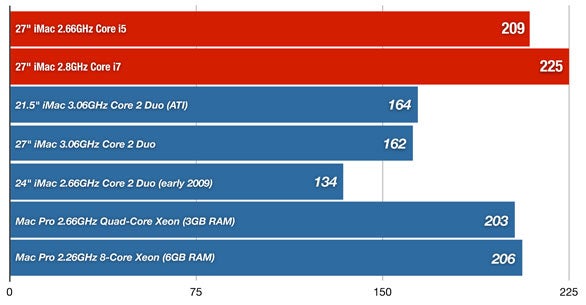
Apple posted a link to this article by MacWorld.  In their tests, the new iMac quad-core machines with the i5 or the i7 processors are better than either the current Mac Pro with the entry-level quad-core or the 8-core machines.  The obvious question will be "When will Apple upgrade the Mac Pro entry-level processors?"  That would seem to be the next logical step from a product line perspective.

From a cost vs. benefit and performance vs. space issue, spending this kind of money is an individual decision, but in round numbers, you could get two 27" iMacs for the price of one Mac Pro with a 30" display.  This is based on not paying for any RAID configurations and extra drives on the Mac Pro.    Add those features and you could easily increase the ratio of three iMacs to one Mac Pro (or more than three). The iMac is a lot less cluttering to any work space whether this is your home office or a business.

The 27" iMac display is the same width as the Apple 30" display at 2560 pixels, but a little shorter at 1440 vs. 1600 pixels.

To view the graphic that shows the processor comparison, click here.

For the complete review click here.

Wednesday, September 2, 2009

AirPort Express Option (instead of Sonos)

In this previous post, I listed some options in lieu of spending relatively big money on a Sonos system.

Now I found another option.

If you have an Apple AirPort Express you can connect it to your AirPort Extreme Base Station. Now from your computer, you can control each of the AirPort Express devices and which music plays to each of them. Plus, there's an iPhone or iPod touch app (for free of course) that allows you to remotely access your iTunes library and control all AirPort Express devices. You can also simultaneously play the same music file through all speakers.

I think the only downside I see is that your computer needs to be on the entire time. With Sonos, your computer can be off because the files are on a network-attached drive.

At right around $100 each, you can fairly inexpensively "pipe" music into other rooms. There are no built-in speakers and you will need to connect the "Audio out" jack to some sort of amplifier/speaker system.

Just a brief search revealed that some have technical difficulties trying to connect their AirPort Express with non-Apple routers.


Click here to go to Apple's site for more information about AirTunes and this functionality.

Click here to view Apple's video tutorial on how to set this up with either a Mac OS or a Windows computer and also how to use iPod touch or iPhone as the remote.

Wednesday, July 8, 2009

Couple of (cheaper) alternatives to Sonos

In an earlier post (click here to read), I discussed the features I would enjoy with the Sonos Multi-Room Music System.

Update: I forgot to mention that Sonos also scans all the free Internet Radio Channels and allows you to listen to them just like any files stored on a Network Attached Storage (NAS) device.

If you are not willing and/or able to acquire a Sonos system, here are a couple of cheaper alternatives. Unfortunately you'll need to weigh the costs, benefits and downsides for these options.

Option #1: One or more MP3 players.

For this example, I will use the iPod classics on Amazon.com. For around $249 retail ($229 on Amazon) and a memory capacity of 160GB, it would easily hold most music collections. There are other manufacturer and storage size options for MP3 players.

Benefits:
  • You can take the iPod with you. Sonos stays at home.
  • Cost. You can buy four iPods (not counting speakers) for the price of the entry package Sonos system which only gives you rooms.
  • 160GB device holds more than 30,000 songs (per Apple's website).
  • Can also hold pictures and video.
  • Can use for portable storage of files.
Downsides:
  • No Internet Radio Stations.
  • Limited storage for music collections that aren't compressed and/or are very large.
  • Need to purchase one iPod for each room you want to hear music.
  • Need to purchase speakers (or equivalent) for each iPod.
  • Unable to synchronize playback on all iPods like Sonos. Sonos can play a single MP3 in all rooms. Think of "piping" music throughout the whole house.
Option #2: vtech Wi-Fi Internet Radio
Initially I was very excited to hear about this device until I reviewed the features a little more closely. Click here to check it out. For retail $199 ($138 on Amazon.com), you get a radio that will connect via your wireless Wi-Fi internet connection and allow you to tune in to the free radio stations. It also has RCA and phono input jacks.
Benefits:
  • Cost. $199 is cheap for a ton of radio stations (their website lists 11,000 stations). If radio is all you need (or want) then you could get five of these for the price of the Sonos entry-level system.
  • Built-in FM tuner.
  • Clock with alarm.
  • Fairly small at around 6"x12"x3.5"
  • Battery operated so that it can be moved around the house or outside. It still needs to be within range of the Wi-Fi connection
  • Can plug in an external MP3 player.
Downsides:
  • 2x3W speakers plus a 10W subwoofer may not satisfy some who want to pump up the volume.
  • Cannot connect to an NAS device.
  • Able to connect to files on a PC or Mac. This means that the computer needs to be left on for the files to be played (read: energy use).
  • Not portable (beyond Wi-Fi). Sonos isn't either.
Option #3: MP3 player + vtech Internet Radio
This would mean purchasing one MP3 player and one vtech Internet Radio.
Key Benefits (look above too):
  • Can take MP3 outside of the house.
  • Device can store pictures and video.
Key Downsides (look above too):
  • At about $450 or each combination, the cost for two (2) sets is very close to the Sonos entry-level set which also gives you the ability to play in two rooms.
  • More electrical plugs and power cables (sometimes they seem to be everywhere!)
  • 6W (3Wx2) + 10W subwoofer output is nothing compared to Sonos 110W (55Wx2) output.
Bottom line: it all comes down to weighing needs vs. wants and then costs for certain features.

Competitor to Sonos
Note also that Linksys by Cisco has a system very similar to Sonos called "Wireless Home Audio." You can read more by clicking here: Cisco Linksys Wireless Home Audio Executive Kit--Includes One Director with IR Remote and One Set of Speakers. Sonos had their product out first. Maybe for an upcoming post, I'll do a more direct comparison. The retail pricing is very similar to Sonos at $999 for a two room system.

Disclosure: at the time of this post, I did not directly control shares of Apple or Cisco.

Friday, June 5, 2009

Buy a Mac, get an iPod touch

Apple is running a special from May 27, 2009 to September 8, 2009. Buy a Mac via your education discount and get up to $229 back on the purchase of an iPod touch.

Click here to go to the Apple site for more details.

Remember: Don't buy the Mac just because you're getting an iPod touch. Get a Mac because you "need" it and it's great that "oh by the way" you're getting an iPod touch. Just as an FYI, at this time, I haven't felt the need for any mp3 player.